
Brand workflow
Create Consistent Brand Product Photos
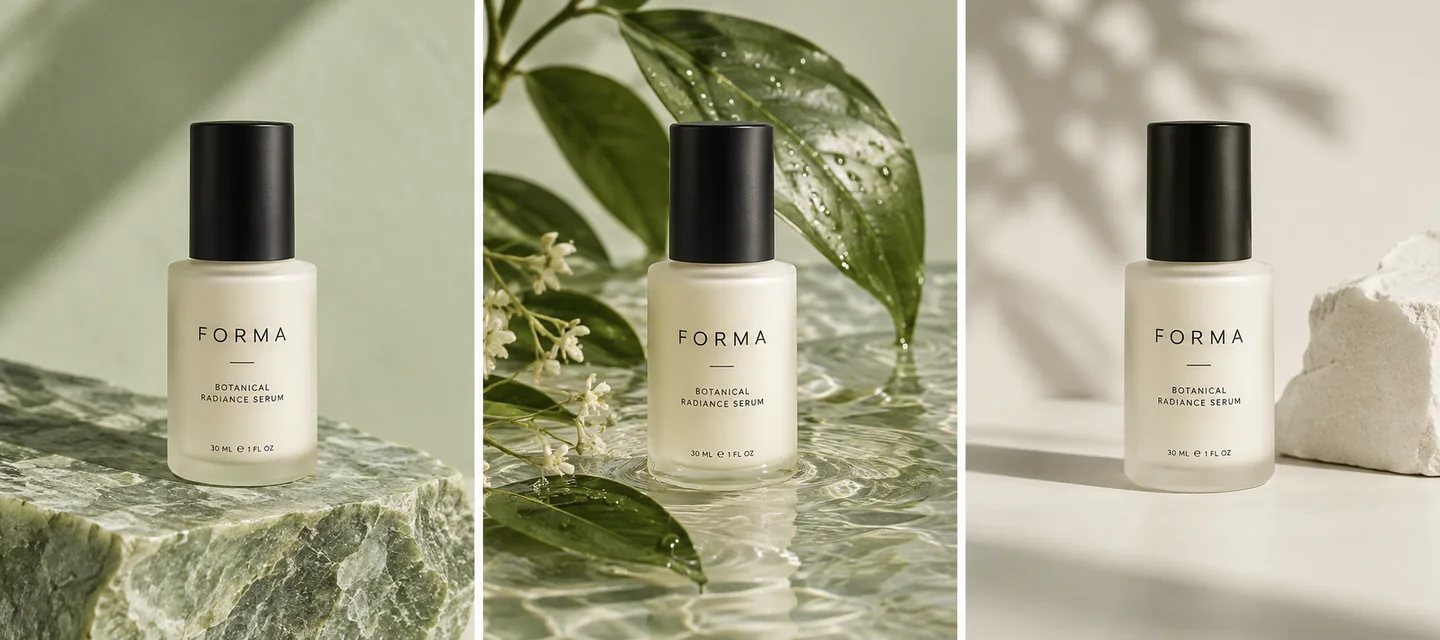
Use one clear visual reference and a repeatable brief for palette, lighting, surface, camera angle and product scale. In AI Studio, provide your actual product photo and the reference, then describe which style elements you want to carry across the set. Review the outputs together and against the source photo. A reference guides the workflow; it does not guarantee identical styling or train a private brand model.
Updated 4 October 2026 · Glowya workflow guidance
Your repeatable visual brief
| Decision | Example direction | Check in every image |
|---|---|---|
| Palette | Ivory, muted green, neutral shadows | Product colour stays accurate |
| Light | Soft daylight from one side | Reflections do not hide the label |
| Surface | Stone, water or a clean studio set | Props fit the campaign story |
| Framing | Full product, similar apparent size | No clipped handles or packaging |
| Reference | One coherent style image | Requested style versus actual result |
The example palette is a fictional creative direction. Choose the brief that fits your own product and approved brand assets.
What makes a useful style reference?
Choose an image with a clear lighting direction, palette and composition. A reference containing several conflicting looks gives you less control over what you are asking the model to repeat.
Separate the product facts from the style. Your own photo defines the item you sell; the reference communicates how you want the scene to feel. Describe both roles in the brief.
What should stay fixed and what can change?
Keep the product, palette, light and approximate camera language fixed. Change one scene element at a time: a surface, a prop or a background. This makes differences easier to understand and review.
- Keep fixed
- Product identity, approved colours, label, relative scale and campaign direction.
- Vary deliberately
- Surface, background detail or composition needed for a particular placement.
- Reject when
- The image changes product details, introduces unsupported features or drifts from the visual brief.
How do you review a whole set?
Compare the images side by side at thumbnail size first. Look for a consistent product scale, highlight direction and colour balance. Then inspect packaging and small details at full size.
Keep the original photo next to the final set. A coherent campaign still needs accurate product representation. Regenerate an outlier or adjust the brief instead of assuming every output will match.
Put the guide into practice
- 01
Prepare the product and reference
Use a clear actual product photo and one coherent style reference.
- 02
Repeat the visual brief
Describe palette, light, surface, camera angle and what must remain accurate.
- 03
Compare and refine
Review the set together, reject detail changes, and refine a specific part of the brief.
A few things to know
Does a reference image guarantee identical results?
No. Treat it as guidance. Compare each output with the reference and with the actual product.
Does this train a brand-specific model?
This guide describes the existing reference-image workflow. It does not claim private brand-model training.
Are the three FORMA scenes verified Glowya outputs?
They are AI-generated conceptual illustrations of a consistent visual direction, not a measured before-and-after product test.
Make the next visual your own.
Generation requires an active membership and sufficient credits. Any introductory offer depends on your account and the current checkout. See Plans for current pricing and eligibility; there is no permanent free generation tier. View pricing.